Showing posts with label Location Tracking. Show all posts

Tuesday, January 5, 2016

HPE Discover - London 2015

Recently Added-522

I was invited to take part in the Hewlett Packard Enterprise (HPE) Discover event in London recently. This event was the first expo since HP acquired Aruba. The event was much larger than I'd anticipated - there were at least 16,000 people in attendance. Dozens of demonstration zones were sprinkled throughout the show floor. 

The demonstration of MU-MIMO was well done through an animated video equating spatial streams and airtime fairness with fast, small and big cars traveling down the highway. The video was well done and would be useful for non-English speaking attendees of the event.

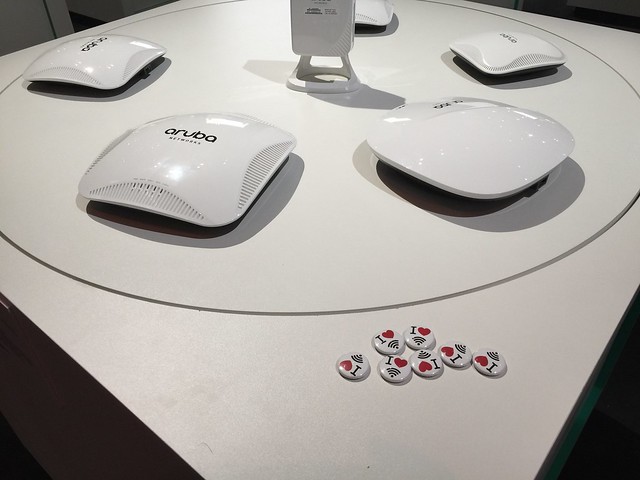
The show floor had stacks of networking hardware on display (in areas where there was no accompanying demonstration space) which I suspect would fall a little flat for the attendees who were not familiar with the newly aquired line of Aruba access points and wireless controllers. The diplay stack should have had signage to lead the attendee to where they can view this hardware in action or have an HP/Aruba TME explain the intracacies of the hardware.

I used the HPE Discover 2015 Tours application which was created for this event (for iOS and Android). The show floor had HPE(Aruba) bluetooth low energy (BLE) beacons distributed at the thirty-eight (38) strategic locations where the self guided tour could be utilized. At first launching the app crashed when I selected Demo 1212 "Securely integrate IoT deployments". When I relaunched the app, it worked and I was able to listen to the recorded narrator or read the transcript to get more information on the demonstration spot. Out of curiosity I searched the application for the four digit number on a nearby demonstration screen to see if that demo was also part of the app. My search results were blank, so I could only assume that it was not included. I think that the app should have been programmed to indicate that my selection was invalid or that the search query was not part of the app demo program.

The Collaboration demonstration of the interactive conference room was quite compelling. The demo tablets provided to the people taking place in the demonstration allowed their pseudonyms to be welcomed aloud by Cortana which was also launching the video meeting once all of the attendees were in the room. Once the conference started, lights on the outside of the conference room turned red to indicate the room was in use. When the conference ended, all meeting notes or chat session transcripts were automatically emailed to the attendees. The combination of the Aruba BLE beacon in the conference room with the Microsoft/Cortana enablement made a compelling story for automating conference call greetings as well as distributing the meeting notes automatically post onference call.
Recently Added-593
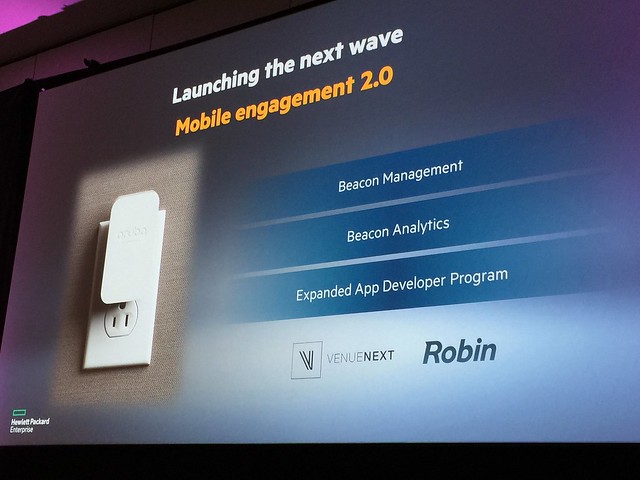
The big announcment from HPE Discover was the Aruba BLE Sensor (in my opinion). The Aruba Sensor is a device which plugs into any electrical outlet (the plug connector types are modular and are available for any plug type). It has a BLE beacon in it as well as a wireless capabilites which allow the sensor to manage up to 10 BLE beacons. This means that if a BLE beacon requires reprogramming, physical proximity is no longer required. The Sensors are managed through a web UI and changes to nearby Aruba BLE beacons can be done over the air. It is also possible to monitor the Aruba BLE beacon status from the same web UI as well as setup notifications/alerts when BLE beacons are no longer detected or if the BLE beacon battery status changes.

It is in the roadmap to bring this Aruba Sensor application into AirWave and use the mapping/location placment of the BLE beacons from the application into the single pane of glass management GUI which is AirWave. What is interesting is that the Aruba Sensors do not require an Aruba wireless infrastructure. Since the application which allows the remote managment of the Sensors and BLE beacons is standalone, it can be used in any wireless deployment situation.

The Aruba Sensor has a small form factor with a micro USB slot as well as an on/off power button (for regulatory compliance) as well as a four pin serial port interface. The serial port is to support legacy connections as well as debugging of the sensor. The BLE beacons that the sensor can manage are either small, standalone beacons which are battery powered, or USB beacons which are supported by recent models of Aruba access points.

I sat in on the session "How tomorrow moves: Mobile-first, cloud-first networking, transforming the digital workplace" led by Dominic Wilde VP of Product Line Management for HP/Aruba and he had a guest speaker (Doug Crawford VP of Global Network Services for WB/TimeWarner) who exolled the virtues of an all wireless office and how deploying a pervasive, location aware wireless infrastructure had enabled the WB to speed the turnaround time for wardrobe requests as well as catering deliveries. These two examples alone is saving WB thousands of dollars that would've been lost due to the length of turnaround time for these tasks previously. The are working to make the WB studio even more interactive through the use of BLE beacons at the major soundstages to bring video clips and interviews of who has used which soundstages and for which films or movies to the guests who are taking a backstage studio tour of the property. I think Mr. Crawford's presentation would have been more captivating and personal than the scenarios presented during the keynote.

My key takeaway was that the wireless capabilities that Aruba offers post acquision should have been highlighted more prominently at HPE Discover. I say this due to the large number of people who stood up and left during the Day One keynote when the topic of a mobile workforce became the topic of discussion. Many people seemed to miss the importance of the joint forces of Aruba and HP because they literally got up and walked out. It could be that all wireless offices haven't caught on yet in Europe (which I find hard to believe) or that the business use cases used during the keynote did not come across as compelling.

Full disclosure: HP/Aruba invited me to attend HPE Discover and paid for my airfare and hotel during my time in London for the HPE Discover event. I received gifts including an umbrella and jacket. The sponsorship of my travel or the gifts I received in no way influenced my opinion of the HPE Discover event.

Friday, January 17, 2014

Customer Loyalty, Location Tracking, Big Data and iBeacons

A lot of technology has recently entered the world of retail analytics. Some of it leverages Wi-Fi, some Bluetooth, some audio, but all of it is competing for your customer loyalty (Big Data). The crux of it all is an attempt by the retailer to engage with you, the customer by giving you coupons/discounts in trade for your demographic data or because you completed a task.

Gigwalk connects people/companies who need workers to fulfill temporary workload. Users of Gigwalk can agree to fulfill a requested task/service and receive payment via PayPal. You can think of it as a way for an employer to hire a temp worker without ever performing an interview. Gigwalk is an interesting way to connect employers with employees to complete piecemeal work. It reminds me a little of TaskRabbit but less errand/chore based and more task completion.

Checkpoints awards you points for completing surveys, watching videos, shopping online etc. Checkpoint is aligned with manufacturers instead of retailers. inMarket operates the largest mobile shopper platform and the underlying technology used is the iBeacon platform. 

iBeacons leverage Bluetooth Low Energy (BLE) to create a location-aware, context-aware wireless network within a retail establishment. The proximity information can be used to send targeted marketing to nearby smart phones to encourage purchases or to award users of the app with points for scanning product barcodes into the app.

Shopkick awards you points ("kicks") for visiting stores, scanning products or making purchases from retailers in the Shopkick network (Sports Authority, Macy's). The "kicks" can be accrued and turned into gift cards, free coffee awards or other prizes. The odd thing I read about Shopkick is that the app asks for permission to use the microphone on your smartphone. This is because the app listens for a specific frequency/sound pattern being transmitted from the Shopkick beacon installed in the store. The app also has the potential to record the audio during a TV broadcast if that is part of an opportunity to earn kicks. This is outlined the Shopkick privacy policy, but I doubt many Shopkick users will actually read this or the app EULA.
"record, determine or use information about or from another content delivery platform (for example, to unlock potential rewards or offers based on your watching of a specific a commercial or show that is broadcast on your television or on the web, the shopkick application may ask you to open the app while you are watching TV, and then we may record or analyze the audio signal from the television set via the shopkick app and your cell phone’s microphone, to determine the commercial, and/or program, including the date and/or time), and (v) record information derived from such above information and other sources such as entries and offers viewed on our website or on our social media presence, or information provided by Affiliated Partners (collectively, “Non-Personally Identifiable Information”)."
Stepsaway is another shopping app that detects customers' smart phones when they are near stores in shopping centers or other public spaces. Stepsaway allows retailers to use a cloud managed platform to push notifications to customers within range of their stores.

It is abundantly clear that the customer is actually the product. Brick and mortar stores are competing with one another for the attention (and wallet) of the consumer. Retailers are willing to offer exclusive discounts to customers to win/retain customer loyalty. What you're trading for those discounts is more than just the space the app takes up on your phone. You're often asked to trade your phone contacts, access to your photos, microphone and location in trade for access to the perceived benefits of the rewards network (via the app).

I'm not the target audience for customer loyalty/shopping apps, but the things I've been reading started me thinking about privacy issues, potential legal issues and how to avoid inadvertently contributing to the demographic database pool.

The fact that the iBeacon technology is Bluetooth with a different name leads me to wonder about how much interference iBeacons add to the 2.4GHz spectrum. How does a wireless infrastructure differentiate between an iBeacon and a Bluetooth source of interference?

Wireless technology is evolving quickly in many disparate ways. It's unclear how iBeacons will be used outside of the retail vertical, or when an active/passive RFID implementation would be preferential over Bluetooth. It's an exciting time in the world of wireless! Some of it makes me a little leery, but I'm hopeful for the possibilities of a more connected world.

Friday, March 2, 2012

How to get the Cisco MSE virtual machine up and running on an ESXi 5.x server

It took me a bit of time to get the new Cisco MSE VM up and running on my ESXi 5.0 box. I used the vSphere client from an XP64 vm to deploy the OVF template according to the video instructions posed by Cisco on YouTube.


But when the VM import was completed, I couldn't start the VM because the MSE OVA file is configured with 8 vCPUs. The error I received when trying to startup the MSE VM was indicating that I needed to run the command esxcfg-advcfg -s 1 /Cpu/AllowWideVsmp at the CLI of the ESXi server.

I had to do some searching to figure out how to get to the CLI of theESXi box. The
solution I found was written up ages ago by Rick Vanover.

I also found out the hard way that you can't have two vSphere clients managing the same ESXi box. If you find yourself facing the error message
Call "PropertyCollector.RetrieveContents" for object "ha-property-collector" on "[IP ADDRESS] ESXi failed. that's what's going on there.

Of course, I also forgot what the default username/password combination is for an MSE VM. For the record, th
e default user ID is root and the default password is password.

Monday, April 18, 2011

Cisco WCS calibrating location tracking for wireless clients

The Wireless Control System Configuration Guide goes over how to manage RF Calibration Models, but it does not however describe how long the process takes, or what exactly it entails. I will endeavor to describe the process according to how I've calibrated RF models.  I do not know if how I'm doing this is correct, this has been a matter of trial and error. You don't get the opportunity to calibrate RF deployments too often, and the number one reason for that is most likely how long it takes to complete the calibration.


I haven't had much luck using the linear calibration model, so I use the point calibration model instead. I configure my wireless card to operate as an 802.11a client for one set of point calibrations throughout the facility, then I configure it to operate as an 802.11b/g client (only) for the second pass at the calibration process.


I don't stop calibrating the floor area until I have covered the floor area with data points from one corner of the floor to the other. I don't know if this is necessary given the paragraph above, but the data collected across the floor area appears as "complete" to a customer reviewing the RF calibration.

Recently I did a full calibration of a 34,000 square foot facility. The deployment consisted of 11 3500i series CleanAir access points.  The time to calibrate from beginning to end was approximately 4 hours.  Two hours to calibrate for the 5GHz frequency, and two hours to make a second pass to calibrate for the 2.4GHz frequency. Each point calibration location sampling took at least two minutes to complete.

Neither of the design/configuration guides tells you exactly what you're supposed to do with the laptop when you're using the point collection model, unless you're really supposed to pirouette while holding the laptop. I tried to follow this example for the first calibration I did - it just ended up making me dizzy. Now I stand in one place and change the laptop orientation while changing the direction I'm facing. I've found that if I hold the laptop in the same orientation the data point collection fails quite often.

I made a video showing all the stages of the calibration process to help explain how the process is done, and the method I've used for collecting data points.


There are several important bits of information spread throughout the WCS 7.0 Configuration Guide and the Wi-Fi Location-Based Services 4.1 Design Guide.  I will list them below.

"Due to an open caveat1 concerning the use of dual-band calibration clients and performing a location calibration data collection on both bands simultaneously, it is recommended that calibration data collection be performed for each band individually at this time. When using a dual-band client, use either of the following alternatives:
1.Perform the calibration data collection using a single laptop equipped with a Cisco Aironet 802.11a/b/g Wireless CardBus Adapter (AIR-CB21AG) on each band individually. For example, proceed to disable the 5 GHz band and complete the data collection using the 2.4 GHz band only. Then, disable the 2.4 GHz band and enable the 5 GHz band, and proceed to repeat the data collection using the 5 GHz band only.
2.Perform the calibration using two people and two laptops. Each laptop should have a Cisco AIR-CB21AG and be associated to the infrastructure using a different band. The two calibration operators may operate independently; there is no need for them to visit each data point together. In this way, a complete calibration data collection can be performed across both bands in half the amount of time as option #1 above."

and

"Temporarily disable Dynamic Transmit Power Control (DTPC) prior to conducting calibration data collection. DTPC must be disabled separately for each band using either the controller GUI, the controller CLI or WCS for each controller whose registered access points are expected to participate in calibration data collection. After calibration data collection has been performed, DTPC should be re-enabled for normal production operation.

Ensure that the WLAN to which your calibration client will associate is configured to support Aironet Information Elements (Aironet IE). Doing so will enable the use of unicast radio resource measurement requests during calibration data collection for more efficient operation."

According to the WCS Configuration guide: "Only Intel and Cisco adapters have been tested. Make sure the Enable Cisco Compatible Extensions and Enable Radio Management Support are enabled in the Cisco Compatible Extension Options."

Also of note from the WCS Configuration guide: "The calibration status bar indicates data collection for the calibration as done, after roughly 50 distinct locations and 150 measurements have been gathered. For every location point saved in the calibration process, more than one data point is gathered. The progress of the calibration process is indicated by two status bars above the legend, one for 802.11b/g/n and one for 802.11a/n."