Showing posts with label Wireless. Show all posts

Friday, February 13, 2026

This article was written by a human (me), not an AI.

In the timeless words of Jim Anchower: “Hola Amigos! It’s been a long time since I’ve rapped at ya.” A lot has happened and a lot hasn’t happened since I last posted. 


I’ve self-published three books for yoga leaders, fulfilled over 300 Etsy orders, developed a deeper skill set with Inkstitch/Inkscape and I’ve continued to work in the Wi-Fi space, but I feel that I have not contributed a lot to the larger Wi-Fi community during these recent years.


During the past ten years, my passion for researching, documenting, compiling and sharing information was focused on my yoga teacher trainings. I wanted to document what I’d learned, and document it in a way that used easy to understand language. I compiled books on hands-on assisting, yoga props and a guidebook of daily quotes and class themes for power yoga teachers. I created a Yoga Alliance certified teacher training manual, course schedule, syllabus, daily/weekly/monthly agenda, co-led a yoga retreat, established an LLC and opened a small yoga collective with several of the yoga teacher training graduates.


I have completed these things to the best of my ability and now I am returning my focus to contributing to the Wi-Fi community. 


After WLPC 2024, I was inspired to create Willow Wi-Fi. Willow was going to be how I reinvented my method of contributing to the Wi-Fi community. I started in earnest. I brought Willow to life as a fully articulated pupped with a full wardrobe and accessories, took her to Aruba Atmosphere, even toured the show floor with Dan the Man! I successfully made a few videos and when I was just getting going, life gave me a bucket of lemons which derailed my self confidence and undermined my desire to make a visible contribution online. I didn’t make lemonade. I took a step back.


Time has passed, and I am back. This week is #WLPC2026 in Phoenix and I have also accepted the nomination to be a delegate at Mobility Field Day 14 in May of 2026. 


If I’m handed more lemons, this time there will be lemonade. I have too much to share with the world. Staying hidden doesn’t serve my higher purpose to be a source of contribution.


My next big move is a literal big move. My husband and I and our three cats (!) are moving to The Netherlands. Our goal is to be moved by October of 2026. We’ve set our sights on Nijmegen. We’ve visited there several times and enjoyed everything about the city, the culture and surrounding landscapes.


Between now and then I will be organizing, thrifting, selling or gifting everything that I have filled our house during our time in Tampa. The enormity of the task grows or shrinks depending on how much energy I give to seeing it as the end of something or imagining the possibilities of what is yet to come. I look forward to rekindling old friendships and making new connections as I chart a new path forward both metaphorically and quite literally.

Tuesday, November 19, 2019

Technology for Travelers


Navigating a new city can be pretty stressful. After spending 9 days in Tokyo & 4 days in Manchester (by way of Heathrow LHR), I can definitively say that having fast, free wifi can make a world of difference in the experience of navigating public transportation systems.

I was able to navigate with Google Maps all over Tokyo with no problems whatsoever. The PASMO train card kiosk was easily switched to English so we could get PASMO cards. Topping up the card with more Yen throughout the week was also easily done.  Tokyo had fast, free wifi in and/or on every train we were on during our stay there.

Landing at Heathrow and attempting to find the correct kiosk to print the train tickets I purchased online was a runaround of bad directions from several different train line employees. Finally I got the tickets, got directions and went down to the Underground station. What I saw on the platform didn't line up with the directions we'd been given so I tried to connect to Google Maps and compare. No such luck. No cell coverage, and the wifi charged me £5 and then it didn't even work. Eventually we made it to the National Rail train which purported to have onboard wifi. The Speedtest app said it was 1.86 down and 10 up, but it was worthless in my experience of trying to use it.

Now that I've had time to decompress after returning home, I did some digging to find out WHY there was such a huge difference in my experience. Here are some facts about the Tokyo train system: built around 1927 or so, current daily rider numbers hover around 8.6 Million people. Tokyo has had free wifi in/around their trains since 2016. London's Underground was built around 1863 or so and currently moves around 5 Million people a day. Back during the Olympics in 2012, there was some limited (an hour a day) wifi on the platforms, concourses and escalators. Now it is all pay-as-you-go (but it doesn't work even if you pay).

Initially I was worried about my language barrier in Tokyo, but that proved to be no issue at all because I had constant Internet access from my phone and didn't have to ask anyone for directions. Comparatively, getting directions in an English speaking country proved to be much harder because of conflicting information and no Internet connectivity to verify what we'd been told was correct or not.

In short - go to Tokyo. Get on the train, use the wifi and go have an adventure wherever you've chosen for your destination. It'll be a lot easier than you might think. Word to the wise: if you've got luggage of any kind - don't use the Underground. Take a taxi or better yet, fly into Manchester instead of taking the tube/train to get there from Heathrow. Trust me on this.

I took about ten million pictures in Tokyo. Here they are.

Friday, June 7, 2019

What Is A Predictive Survey?


It would seem that somewhere along the line the rumor got started that predictive surveys are magical, mythical things that are conjured out of thin air by the power of an 'easy' button.

If I had a nickel for every time I've had to level set someone's expectations on how long a predictive survey should take, could take or will take; the stack would be pretty high.

I made an informational video explanation on what a predictive survey is and the difference in the length of time to define all of the RF obstacles when the wireless engineer has a CAD file of the floor plan vs. any other image file of the floor plan. The video is eight minutes long and has a disclaimer at the end for all the YouTube people that feel the need to tell me what I left out, or how I didn't explain it right (according to them).


This video is not intended to be an all-encompassing explanation of all of the phases of a predictive survey. The content is solely my opinion. Do not attempt to perform a predictive survey without having attended an Ekahau training class, preferably the Ekahau ECSE Design course. Any and all images used retain the copyright of the original creators.

Wednesday, September 26, 2018

Meraki's LittleTable Isn't So Little Anymore #MFD3


Way, way back in 2013, I attended Wireless Field Day 4 and I heard a presentation by Sean Rhea of Meraki about their backend database LittleTable, how it was developed, how it worked and how it grew. A few highlights of Sean's presentation covered the server redundancy with data-center redundancy, service provider redundancy and location-redundancy. At that point, the scale per server was a few thousand Meraki devices (switches, wireless Access Points, MXs), hundreds of thousands of clients and hundreds of Gigs of data. The presentation was fascinating to say the least. Recently I had the opportunity to be brought up to date on the status of the Meraki LittleTable database by Jeevan Patil (PM for wireless) and I was a delegate at Mobility Field Day 3 (MFD3).

Meraki has a new (beta) feature in their dashboard called Wireless Health. It is a new feature they enabled in their dashboard that supports all of the Meraki access point models and didn't require their customers to add any additional licensing (or costs) to get this data. Approximately 750,000 networks worldwide now have the ability to see data on poorly performing client devices and access points in a single click. I powered on my older Meraki MR34 access points and added two new MR42 access points to my home (it is a 1928 Florida Faraday cage) and waited for the metrics to trickle into my dashboard.


Now I can see which of my client devices are behaving badly (authentication failures and latency issues). The LittleTable database is so efficient that over 250 billion rows written and one trillion rows queried to the database per day and millions of network devices deployed across 230,000 customers check-in to the dashboard daily. Dashboard.merkaki.com serves 800 million pages to 100 million clients who connect to the dashboard every day. The data in the dashboard is refreshed every second, this makes it extremely useful for troubleshooting. Now I know it is my iOS device is having the worst experience, which makes sense because my apple watch is often left on the charger and not on my wrist. It probably is having a hard time talking to my phone. They're rarely in the same room and my phone rarely has bluetooth enabled.


The Meraki dashboard is amazingly responsive (usually within a second of a click). The responsiveness of the dashboard is pretty amazing considering how many queries are being called every second to the backend database, all across the globe at any given time.


If you want to be brought up to date on what's happening at Meraki, I suggest you check out their video from MFD3 if you haven't already.


Cisco Meraki Mobility Updates from Stephen Foskett on Vimeo.

Thursday, March 30, 2017

A Confluence of Divergent Interests - Interop ITX 2017


I'm inordinately excited to announce that I will be speaking at Interop ITX 2017 and leading two morning yoga classes this year! I couldn't be happier to combine my love of Wi-Fi and yoga at Interop.


You can find me Wednesday May 17th discussing "Wireless Security Gotchas to Avoid" and leading morning yoga classes (poolside) Wednesday and Thursday morning 7am to 8am.

You can save 20% off any Interop pass with the discount code HUBER.

See you soon at Interop at the MGM Grand in Las Vegas!


You can read more about my love of yoga over on my other blog www.JenTechYoga.com

Tuesday, January 5, 2016

HPE Discover - London 2015

Recently Added-522

I was invited to take part in the Hewlett Packard Enterprise (HPE) Discover event in London recently. This event was the first expo since HP acquired Aruba. The event was much larger than I'd anticipated - there were at least 16,000 people in attendance. Dozens of demonstration zones were sprinkled throughout the show floor. 

The demonstration of MU-MIMO was well done through an animated video equating spatial streams and airtime fairness with fast, small and big cars traveling down the highway. The video was well done and would be useful for non-English speaking attendees of the event.

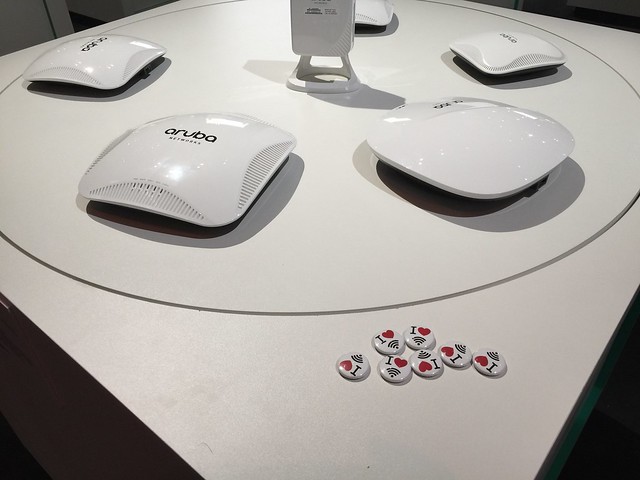
The show floor had stacks of networking hardware on display (in areas where there was no accompanying demonstration space) which I suspect would fall a little flat for the attendees who were not familiar with the newly aquired line of Aruba access points and wireless controllers. The diplay stack should have had signage to lead the attendee to where they can view this hardware in action or have an HP/Aruba TME explain the intracacies of the hardware.

I used the HPE Discover 2015 Tours application which was created for this event (for iOS and Android). The show floor had HPE(Aruba) bluetooth low energy (BLE) beacons distributed at the thirty-eight (38) strategic locations where the self guided tour could be utilized. At first launching the app crashed when I selected Demo 1212 "Securely integrate IoT deployments". When I relaunched the app, it worked and I was able to listen to the recorded narrator or read the transcript to get more information on the demonstration spot. Out of curiosity I searched the application for the four digit number on a nearby demonstration screen to see if that demo was also part of the app. My search results were blank, so I could only assume that it was not included. I think that the app should have been programmed to indicate that my selection was invalid or that the search query was not part of the app demo program.

The Collaboration demonstration of the interactive conference room was quite compelling. The demo tablets provided to the people taking place in the demonstration allowed their pseudonyms to be welcomed aloud by Cortana which was also launching the video meeting once all of the attendees were in the room. Once the conference started, lights on the outside of the conference room turned red to indicate the room was in use. When the conference ended, all meeting notes or chat session transcripts were automatically emailed to the attendees. The combination of the Aruba BLE beacon in the conference room with the Microsoft/Cortana enablement made a compelling story for automating conference call greetings as well as distributing the meeting notes automatically post onference call.

Recently Added-593
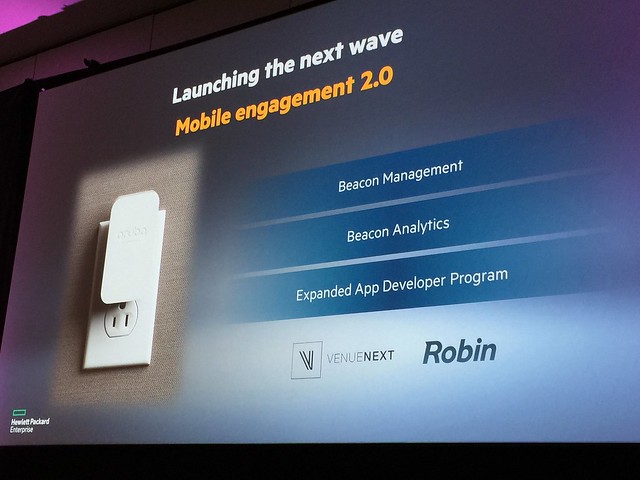
The big announcment from HPE Discover was the Aruba BLE Sensor (in my opinion). The Aruba Sensor is a device which plugs into any electrical outlet (the plug connector types are modular and are available for any plug type). It has a BLE beacon in it as well as a wireless capabilites which allow the sensor to manage up to 10 BLE beacons. This means that if a BLE beacon requires reprogramming, physical proximity is no longer required. The Sensors are managed through a web UI and changes to nearby Aruba BLE beacons can be done over the air. It is also possible to monitor the Aruba BLE beacon status from the same web UI as well as setup notifications/alerts when BLE beacons are no longer detected or if the BLE beacon battery status changes.

It is in the roadmap to bring this Aruba Sensor application into AirWave and use the mapping/location placment of the BLE beacons from the application into the single pane of glass management GUI which is AirWave. What is interesting is that the Aruba Sensors do not require an Aruba wireless infrastructure. Since the application which allows the remote managment of the Sensors and BLE beacons is standalone, it can be used in any wireless deployment situation.

The Aruba Sensor has a small form factor with a micro USB slot as well as an on/off power button (for regulatory compliance) as well as a four pin serial port interface. The serial port is to support legacy connections as well as debugging of the sensor. The BLE beacons that the sensor can manage are either small, standalone beacons which are battery powered, or USB beacons which are supported by recent models of Aruba access points.

I sat in on the session "How tomorrow moves: Mobile-first, cloud-first networking, transforming the digital workplace" led by Dominic Wilde VP of Product Line Management for HP/Aruba and he had a guest speaker (Doug Crawford VP of Global Network Services for WB/TimeWarner) who exolled the virtues of an all wireless office and how deploying a pervasive, location aware wireless infrastructure had enabled the WB to speed the turnaround time for wardrobe requests as well as catering deliveries. These two examples alone is saving WB thousands of dollars that would've been lost due to the length of turnaround time for these tasks previously. The are working to make the WB studio even more interactive through the use of BLE beacons at the major soundstages to bring video clips and interviews of who has used which soundstages and for which films or movies to the guests who are taking a backstage studio tour of the property. I think Mr. Crawford's presentation would have been more captivating and personal than the scenarios presented during the keynote.

My key takeaway was that the wireless capabilities that Aruba offers post acquision should have been highlighted more prominently at HPE Discover. I say this due to the large number of people who stood up and left during the Day One keynote when the topic of a mobile workforce became the topic of discussion. Many people seemed to miss the importance of the joint forces of Aruba and HP because they literally got up and walked out. It could be that all wireless offices haven't caught on yet in Europe (which I find hard to believe) or that the business use cases used during the keynote did not come across as compelling.

Full disclosure: HP/Aruba invited me to attend HPE Discover and paid for my airfare and hotel during my time in London for the HPE Discover event. I received gifts including an umbrella and jacket. The sponsorship of my travel or the gifts I received in no way influenced my opinion of the HPE Discover event.

Tuesday, March 3, 2015

Aruba, HP, MobileIron, PaloAlto, Arista Networks, what do they all have in common?


As you probably know by now, HP and Aruba have announced their intent to merge into a single corporation. Call it an acquisition, call it a sale, call it a merger, call it whatever you like. This week at Aruba Atmosphere 2015, the keynote presentations made it clear that Aruba and HP are all about partnering with other companies to bring the customer the best-of-breed solution set.

The keynote presentation by Dominic Orr gave us the clear message that things were not going to change. Meg Whitman spoke to us live from Mobile World Congress in Barcelona with a full six second delay between Dominic speaking and Meg reacting. The jury is out on whether or not this was actually a live feed, but the comedic effect of the delay was milked for all it was worth.


I found it very interesting to see Bob Tinker, CEO of MobileIron come on stage after Meg Whitman. I'm wondering if we might see another acquisition by HP, simply based on the focus Aruba is putting on strategic partnerships with companies who help Aruba/HP bring differentiated offerings to market. The lack of a built in MDM solution has been a glaring hole in the Cisco product portfolio for a very long time. Sure, Cisco has partnered with at least 6 different MDM vendors, but since they're only parters - your mile will vary greatly when you're seeing support to implement any give solution.


Chad Kinzelberg, Senior VP Palo Alto Networks went on to describe how the Palo Alto firewalls were much more nimble because they don't rely on the port based communication firewall sets like legacy firewalls do (read: Cisco).


Jayshree Ullal, CEO of Arista Networks rounded out the speaker list. She is by far the best public speaker I've heard present in a very long time. It was clear she had given this messaging about Arista many, many times - but she still managed to sound human doing it.


It will be interesting to see how the merger between HP and Aruba plays out over time, especially when there are so many companies relying on Aruba hardware to have a mobility offering in the first place.

Also, the opening act before Dominic took the stage was really cool! The iLuminate dance team from America's Got Talent kicked off the Atmosphere conference in a unique, geeky, Tron-esque fashion! Whoever booked them for this event deserves a pat on the back! Good work!


Monday, December 29, 2014

Hilton Worldwide Holdings supports Marriott's blocking personal Wi-Fi hotspots


In the latest update to the debacle surrounding Marriott being fined $600k for blocking personal Wi-Fi devices on its properties, Ars Technica reports Google and Microsoft are fighting Marriott's Wi-Fi blocking request.

What I found most interesting in the Ars Technica article is this paragraph:
The American Hotel & Lodging Association, Marriott International, Inc., and Ryman Hospitality Properties submitted a public comment on Marriott’s behalf on Friday, saying that the hotel was merely exercising "reasonable network management practices.”
I find it interesting that the document linked from the article was submitted by Hilton Worldwide Holdings in support of Marriott. I have not seen other headlines indicating other hotel chains are siding with Marriott. I have only seen headlines that Google and Microsoft are fighting Marriott's Wi-Fi blocking request. I then tried to find out which hotels are members of the American Hotel & Lodging Association, but I came up empty handed. I was hoping to see which hotel chains I could switch to if Hilton and Marriott are successful in their petition to block the use of personal Wi-Fi devices in their properties.

In the original Marriott case, the Wi-Fi blocking was being done at Marriott properties in the conference areas to force exhibitors to pay Marriott to have an access point installed for the duration of their conference. This practice is similar to that of hotels forbidding outside food or drink in conference areas which have been booked for events. All food and drink must be purchased from the hotel, along with the room for the event.

A friend of mine told me a story of the last time he stayed at a Marriott in O'ahu. He was using Marriott points to stay there for free and didn't want to pay the $14/day Marriott was charging for Wi-Fi. In the list of broadcast wireless networks was an SSID called "Screw Marriott". Naturally, he was curious and joined the Wi-Fi network. He was presented with a captive portal which said they would provide Wi-Fi at a reduced rate of $4 a day, which would allow him to stick it to the Marriott (as indicated by the SSID). He called the phone number shown, made payment via PayPal to an email address and happily used the "Screw Marriott" network for the week he was there!

If you read the Hilton filing closely, it states that hotels should have the ability to block your personal Wi-Fi to keep their Wi-Fi operational. What it does not say is how they would be blocking personal Wi-Fi devices. I wonder if they were blocking by SSID keyword (jetpack, ClearSpot, MiFi etc) or by spoofing the MAC address of the personal Wi-Fi device once it is detected. If the hotel is blocking by SSID keyword, this list would have to be curated by someone on the Marriott IT team to include the thousands of SSIDs detected by the Marriott wireless infrastructure. If the Marriott IT team is doing an active containment by using their access points to pretend to be the "rogue" access point and tell any associated clients to de-associate. Keyword SSID containment would be an arduous task, and personal hotspot users might escape detection during short hotel stays. Active containment would be a much quicker and invasive method for blocking personal hotspot use.

Either way, I will be monitoring my Mi-Fi connectivity during my upcoming hotel stays. I am currently a member of the Hilton loyalty program and I'll be watching to see if Hilton joins Marriott in blocking Mi-Fi usage. If major hotel chains are successful in the FCC petition to block personal Wi-Fi devices, I will make the switch to staying at a B&B or to a hotel chain which does not engage in this practice.

Thursday, June 26, 2014

Wireless Site Survey Rigs (a repost)

Site Survey Rigs

(an archive of my CWNP post)

By Jennifer Huber On 03/01/2011 - 3 Comments
I’ve been traveling to customer locations to perform wireless site survey work for over four years now, and I can assure you traveling with survey gear can be somewhat tricky, especially if you’re like me and want to avoid checking your bags at the airport. I’ve seen many a survey kit arrive in pieces as a result of the thorough TSA checked baggage ‘screening’. As a result, I’ve come up with some fool proof ways of flying with survey gear stored in my carry-on luggage, while doings so in a way that I’m not holding up the TSA security checkpoint line. 
The gear I carry with me to do an active site survey is a Tessco battery pack, a Cisco 1140 access point (or a Cisco 3500 CleanAir access point), a roll of duct tape, colored ½ inch stickers, a Sharpie, a roll of transparent tape, and the mounting bracket for the 1140/3500 access point. The mounting bracket uses the metal mounting bracket that ships with the 1140/3500 series access point and a wooden block threaded for a painters’ extension pole. The wooden block was at one time a drywall texture brush.

I removed the bristles with a pair of pliers and then spray-painted the wood block gloss black to look more professional.


A pair of Mr. Longarm Angle Adapters allow me to suspend the 1140 access point from the wooden block bracket as if it were installed on theceiling.


I have seen someone use a plastic backed drywall texture brush as their mount for an 1140 bracket, but I don’t have a dremel to grind down the plastic mount to allow for the bumps on the back of the 1140 flat metal bracket.

Those are the basic parts I need to perform an active site survey at the customer location.
Before I discovered Ziploc XL bags at Home Depot I had to pull out the access point and power supply and put them in a bin, and now I use one of these gigantic bags to carry all the survey gear. I can zip open my carry on suitcase and lift all the survey gear out and put it in an x-ray bin in one swift movement.


Since a survey cart is too large to count as carry on luggage, and often don’t have enough early warning about a site survey to ship anything to the site, I’ve had to make do with things that wouldn’t normally pass as a survey cart.  The customer sometimes will have an A/V cart or a utility cart that I can use to survey with, but sometimes I have to be a bit more creative.  I’ve made do with items you wouldn’t normally imagine passing as a cart for surveying. I use the following as examples: the survey kit pelican case, an office chair (works if it is a really small survey); a furniture moving cart, a furniture dolly, and sometimes I even had a proper Rubbermaid cart to use.


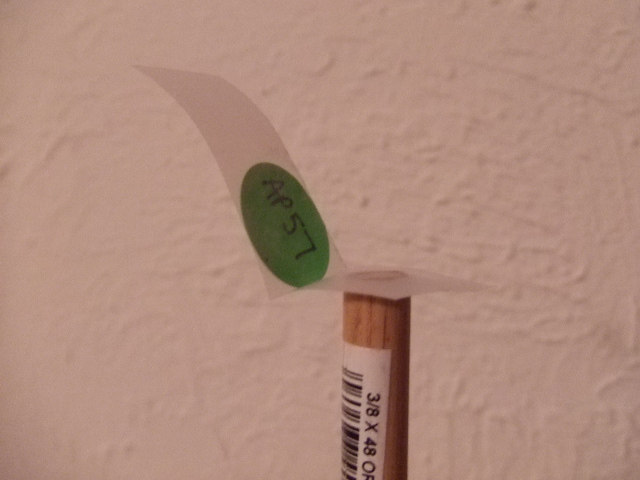
The things I can’t travel with are the Mr. Longarm 12 foot painter’s pole and a dowel rod. These items can be found at any Home Depot, and there has been a Home Depot within driving distance of every site I’ve had to survey. I use the dowel rod to attach the ¼ inch round labels combined with the transparent tape to the suspended ceiling grid to mark the access point installation locations.  I fold the transparent tape into an “L” shape and then stick the tape to the suspended ceiling grid.  This works much better for me than having to find and drag a ladder around with me so I can reach the ceiling to manually mark the access point installation locations.

Several other wireless engineers I’ve worked with have designed their own outdoor survey rigs by using perforated sheet metal strips and crafting survey tripods out of this held together with bolts and wingnuts.  I have also seen survey rigs for outdoor point to point feasibility testing crafted out of sections of PVC pipe.  PVC piping is very sturdy, disassembles easy, and can be used in a multitude of ways to create a survey pole or survey mounting structure.  My friend Jeff Russell has made an outdoor rig for doing a mesh survey from PVC piping, and an indoor tripod mount out of perforated metal (photo gallery at this link).


There are certainly a million different ways to craft a survey rig out of commonly available parts from your nearest hardware store.  The only limit seems to be your imagination. 

Friday, January 17, 2014

Customer Loyalty, Location Tracking, Big Data and iBeacons

A lot of technology has recently entered the world of retail analytics. Some of it leverages Wi-Fi, some Bluetooth, some audio, but all of it is competing for your customer loyalty (Big Data). The crux of it all is an attempt by the retailer to engage with you, the customer by giving you coupons/discounts in trade for your demographic data or because you completed a task.

Gigwalk connects people/companies who need workers to fulfill temporary workload. Users of Gigwalk can agree to fulfill a requested task/service and receive payment via PayPal. You can think of it as a way for an employer to hire a temp worker without ever performing an interview. Gigwalk is an interesting way to connect employers with employees to complete piecemeal work. It reminds me a little of TaskRabbit but less errand/chore based and more task completion.

Checkpoints awards you points for completing surveys, watching videos, shopping online etc. Checkpoint is aligned with manufacturers instead of retailers. inMarket operates the largest mobile shopper platform and the underlying technology used is the iBeacon platform. 

iBeacons leverage Bluetooth Low Energy (BLE) to create a location-aware, context-aware wireless network within a retail establishment. The proximity information can be used to send targeted marketing to nearby smart phones to encourage purchases or to award users of the app with points for scanning product barcodes into the app.

Shopkick awards you points ("kicks") for visiting stores, scanning products or making purchases from retailers in the Shopkick network (Sports Authority, Macy's). The "kicks" can be accrued and turned into gift cards, free coffee awards or other prizes. The odd thing I read about Shopkick is that the app asks for permission to use the microphone on your smartphone. This is because the app listens for a specific frequency/sound pattern being transmitted from the Shopkick beacon installed in the store. The app also has the potential to record the audio during a TV broadcast if that is part of an opportunity to earn kicks. This is outlined the Shopkick privacy policy, but I doubt many Shopkick users will actually read this or the app EULA.
"record, determine or use information about or from another content delivery platform (for example, to unlock potential rewards or offers based on your watching of a specific a commercial or show that is broadcast on your television or on the web, the shopkick application may ask you to open the app while you are watching TV, and then we may record or analyze the audio signal from the television set via the shopkick app and your cell phone’s microphone, to determine the commercial, and/or program, including the date and/or time), and (v) record information derived from such above information and other sources such as entries and offers viewed on our website or on our social media presence, or information provided by Affiliated Partners (collectively, “Non-Personally Identifiable Information”)."
Stepsaway is another shopping app that detects customers' smart phones when they are near stores in shopping centers or other public spaces. Stepsaway allows retailers to use a cloud managed platform to push notifications to customers within range of their stores.

It is abundantly clear that the customer is actually the product. Brick and mortar stores are competing with one another for the attention (and wallet) of the consumer. Retailers are willing to offer exclusive discounts to customers to win/retain customer loyalty. What you're trading for those discounts is more than just the space the app takes up on your phone. You're often asked to trade your phone contacts, access to your photos, microphone and location in trade for access to the perceived benefits of the rewards network (via the app).

I'm not the target audience for customer loyalty/shopping apps, but the things I've been reading started me thinking about privacy issues, potential legal issues and how to avoid inadvertently contributing to the demographic database pool.

The fact that the iBeacon technology is Bluetooth with a different name leads me to wonder about how much interference iBeacons add to the 2.4GHz spectrum. How does a wireless infrastructure differentiate between an iBeacon and a Bluetooth source of interference?

Wireless technology is evolving quickly in many disparate ways. It's unclear how iBeacons will be used outside of the retail vertical, or when an active/passive RFID implementation would be preferential over Bluetooth. It's an exciting time in the world of wireless! Some of it makes me a little leery, but I'm hopeful for the possibilities of a more connected world.

Sunday, June 9, 2013

The Natalia Project: Civil Rights Defenders Using GSM SMS and CPRS to Send Distress Alerts


I read an interesting article in the May/June 2013 Wireless Design & Development magazine. The article was about the Natalia Project, which is named after a human rights worker Natalia Estemirova who was assassinated in 2009 as she was investigating the alleged kidnappings, torture and extrajudicial killings by Russian government troops or paramilitaries in Chechnya.

The Natalia Project is wireless alerting system (much like active RFID tags). The bracelets are able to send distress signals when activated by the wearer, or when the bracelet shows signs of tampering. The tampering sensor activates automatically if the bracelet is removed by force. If the wearer activates the alerting mechanism manually, the bracelet engages a patented locking mechanism to lock the bracelet onto the wearer's arm.

The technology used is a combination of Global System for Communications (GSM) and a Global Positioning System (GPS) chip. The GSM chip is used for sending alarms and location coordinates while Short Message Service (SMS) and other data is sent via General Packet Radio Service (GPRS). If GPS location signals are not available, locations are derived by GSM triangulation.


When a distress signal is triggered, a signal is sent via GPRS to the Civil Rights Defenders servers in Stockholm. There, the authenticity of the alarm is verified and decisions are made as to what information should be shared or posted on social media platforms. Notifying the local police is not a default action of the distress signal, since in many cases, the local police or government agencies could well be the source of the threat.

Volunteers to the Natalia Project can get involved by signing up to receive notifications of distress signals sent from human rights defenders through several social media networks. The hope is that if the public has more visibility into the continual well being of human rights workers, that those that would attack human rights workers would be aware that their actions are being watched. Knowing the exact time and location of an attack can also help catch the attacker(s) quicker and possibly prevent more killings of human rights workers around the globe.


Three years on, Natalya Estemirova's murder unsolved

The obvious caveat to the bracelet is that it must have cellular coverage in order to transmit an alert. I wonder if it's not possible to re-work the technology used in the bracelet to record periodic GPS coordinates. Then, if an alert had been triggered and the wearer was not in a cellular coverage area, the bracelet could send the last known GPS coordinates. That isn't a perfect solution, but it might be a helpful workaround.