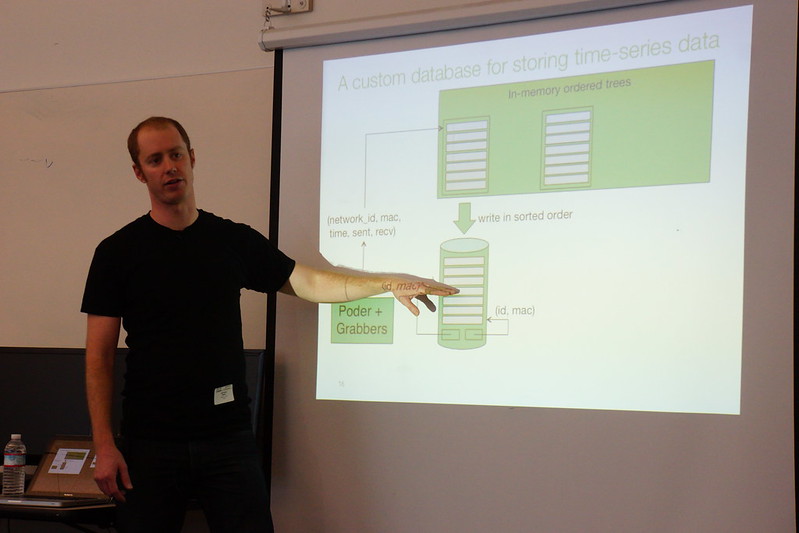
Way, way back in 2013, I attended Wireless Field Day 4 and I heard a presentation by Sean Rhea of Meraki about their backend database LittleTable, how it was developed, how it worked and how it grew. A few highlights of Sean's presentation covered the server redundancy with data-center redundancy, service provider redundancy and location-redundancy. At that point, the scale per server was a few thousand Meraki devices (switches, wireless Access Points, MXs), hundreds of thousands of clients and hundreds of Gigs of data. The presentation was fascinating to say the least. Recently I had the opportunity to be brought up to date on the status of the Meraki LittleTable database by Jeevan Patil (PM for wireless) and I was a delegate at Mobility Field Day 3 (MFD3).
Meraki has a new (beta) feature in their dashboard called Wireless Health. It is a new feature they enabled in their dashboard that supports all of the Meraki access point models and didn't require their customers to add any additional licensing (or costs) to get this data. Approximately 750,000 networks worldwide now have the ability to see data on poorly performing client devices and access points in a single click. I powered on my older Meraki MR34 access points and added two new MR42 access points to my home (it is a 1928 Florida Faraday cage) and waited for the metrics to trickle into my dashboard.
Now I can see which of my client devices are behaving badly (authentication failures and latency issues).
The LittleTable database is so efficient that over 250 billion rows written and one trillion rows queried to the database per day and millions of network devices deployed across 230,000 customers check-in to the dashboard daily. Dashboard.merkaki.com serves 800 million pages to 100 million clients who connect to the dashboard every day. The data in the dashboard is refreshed every second, this makes it extremely useful for troubleshooting. Now I know it is my iOS device is having the worst experience, which makes sense because my apple watch is often left on the charger and not on my wrist. It probably is having a hard time talking to my phone. They're rarely in the same room and my phone rarely has bluetooth enabled.
The Meraki dashboard is amazingly responsive (usually within a second of a click). The responsiveness of the dashboard is pretty amazing considering how many queries are being called every second to the backend database, all across the globe at any given time. If you want to be brought up to date on what's happening at Meraki, I suggest you check out their video from MFD3 if you haven't already.
Sanjit Biswas opened for the Meraki portion of Wireless Field Day 4. He told us that Meraki is still hiring and has started construction on a new office. At the time of the recording it had been only 45 days since the acquisition. Meraki is continuing to develop their product line, there are a variety of devices in the pipeline. The hardware development cycle is very long so it will be some time before there are Meraki/Cisco created APs. As a result of the acquisition, Meraki is now able to go International to Asia Pacific and other parts of Europe where they did not have a presence (previously Meraki was only in the UK and Ireland markets). Meraki is investing in adding richer features and their System Manager has been installed on about one million devices so far.
Sean Rhea took us behind the covers on Meraki's Dashboard. He has a PhD in distributed systems from UC Berkley and joined Meraki in 11/07.
Meraki (now part of Cisco) Cloud Architecture Deep Dive with Sean Rhea from Stephen Foskett on Vimeo. Meraki customers partitioned across different servers, on different shards. This server is effectively a 1u raided server plus 1u backup (in a completely different data center/provider). One of the shards acts is the master and acts as a demultiplexer. Thousands of Meraki devices connect to a shard. 100s of 1000s devices checking in per day 300GB of stats dating back over a year New data is gathered from devices every 45 seconds. If you are actively viewing the device in Dashboard it's every 1 second. Engineering challenges are how to get access to devices behind NATs. The Meraki system mtunnel allows them to talk to their devices even if they're behind a NAT. The tunnel is fully encrypted and the information sent over the tunnel is SSL. Mtunnel is used across the entire Meraki hardware platform. This custom secure tunnel requires only 2 packets/device/25 sec It looks like ipsec, but is not point to point may route from a shard to a shard Devices talk ssl over the tunnel. Each ap ships with a certificate with the shared secret on it. The backend infrastructure is the same across switches and systems manager platforms. Another problem is how to gather this information and minimize network overhead for Meraki & the customers and minimize the cpu costs for Meraki. Meraki has developed a custom database tuned for statistical data. They achieve SSD-like speeds from inexpensive spinning hard disks. Poder is a relatively new system at Meraki, first developed in 2009, then fully revampd in 2011. The idea is to gather stats from hundreds of thousands of client devices via the devices' internal web server. The naive approach • Overview • Each device runs a small web server • each shard runs one grabber daemon per statistic type (usage syslogs uptime etc) • grabber fetches stats from devices as XML over HTTP. Implementation • 1 process per grabber, N+2 threads per process • 1 thread to query DB for new devices to fetch from • N threads to perform blocking HTTP fetches from devices • 1 thread to insert fetch results into DB Naive approach pros and cons • TCP easily carries arbitrarily large responses • Becomes expensive at scale • A single HTTP fetch to empty webpage = 10 packets and 510 bytes • Every grabber does its own fetch, no sharing connections • Lots of threads for I/O parallelism = lots of context switches • Limited to 1 fetch/node every 10 minutes. A high-performance approach (4th gen) • The first thing they created was an event driven RPC engine • Non blocking IO, talks to 10k devices in 20 sec • Uses UDP and Google protocol buffers (binary encoding format) (greatly reduces packet size) • Stats are obtained through different modules lldp modules (each has it's own thread) • Database is read from by each of the different grabbers Example: probing clients module/lldp module A request object is passed through each of the modules, info requests are appended to request sent to the AP. Requests sent to APs often look different than switches due to the different functions that are done by different hardware. The modules are single-threaded, block on DB access and most are 200-400 lines of straight-line Scala code. There are no locking or synchronization issues to worry about. Poder aggregates requests and responses for different modules. Overhead is a minimum of 2 packets/48 bytes for an empty response (80-90% less than previous Poder versions). Now Poder can fetch data every 45 seconds. What to do with the data? Where to store it and how to get it back out to display? The storage cost of all the data that can be collected can be averaged out at 3600 clients (10 apps) (3 records per hour) 72bytes per record = 63gb per year. Your standard OLTP databases (Postgres, MySQL)are not very good at clustering. Unless your working set fits in RAM queries take many seeks. A standard seek can take up to 18 minutes on a traditional hard drive to draw the overview dashboard graph. With the custom database they've created (Little Table) it takes 2 seconds to draw (100mbs a second). Data can't be aggregated because aggregation discards useful information. The peaks can be averaged into data and no longer shows as severe/peaks. Queries are written in order, writes footers with network_id and macs and are flushed every 10 minutes for durability (power outages) APs have statistics stored locally and can be queried again when the system comes back up. The files are merged and stored back to disk (in order) after 28 days (even multiple of seven to make the merge of data 'nice'). Max file size is 2GB to avoid messing with 64bit file pointers. The Meraki data when it is on a Meraki server, it is unencrypted for speed. The data centers where their data is kept meets SAS 70 requirements. When the data is stored offsite for tertiary redundancy, the data is encrypted.
In my opinion, the Meraki presentation about their fine tuned database was the most technically interesting video of all of the presentations we watched during WFD4. I have very limited knowledge of database structures or data storage methods, but Sean held my attention and I think I almost understood what he was describing. Watch the video and see what you think.
Sanjit Biswas CEO of Meraki began the presentation at Wireless Field Day 3. Since the last Wireless Field Day in January of 2012, the company has doubled their number of employees, and has added thousands of new customers.
The Meraki MR product line features Meraki NAC (since 2011), has a 3x3 radio. Depending on the access point model, it is possible to have device based group policies for iPad and Android devices. PCI compliance reporting, SMS login for guest access and Air marshal WIPS enforcement is all possible. The Meraki MX Cloud Management Security Appliance product line establishes an auto VPN, supports application control, link bonding failover, high performance multi-gigabit firewalls, content filtering anti malware, as well as WAN optimization. The Meraki MS switch line supports virtual 1g/10g stacking, VoIP prioritization, 802.1x port security and Layer 7 visibility. The Meraki SM Systems Manager is their Mobile Device Management tool, which is available as a free download. It supports management of Macs, PCs and mobile devices via the cloud. In short, Meraki wants to have a single unified access layer to manage wired and wireless network components. Meraki also now has a 2 day certification course covering wireless, switching, MDM and firewalls.
Ben Calderon VP of Hardware and Operations described Meraki's three phases of building and testing their products. Many technology partners are creating chipsets that Meraki uses:
Applied Micro
Skyworks
Qualcomm
Microsemi
Freescale
Broadcom
Bitesse
Integrated Device Technology
The radio design of a Meraki access points sometimes may include a filter for dual concurrent operation to negate spurious emissions. During early testing with the MR24 access point, it was discovered through testing that a firmware work-around was required to adjust settings to optimize band edge performance of the access point.
Per Ben, the MR24 PIFA antennas give you the best transmit efficiency. The form and function are determined through SLA models, machined models and hard tooling. The fit and finish includes a durable enclosure which goes through reliability testing. It is a UL2043 smoke tested, plenum rated enclosure (the plenum rated plastic is the most expensive piece in the AP construction!) The MR24 is drop and vibration tested to ensure reliability of the shipping units. The MR24 is IP67 certified (operates after 1m water submersion) and the aluminum housing is undercoated before it is painted. Kiren Sekar VP of Marketing described how there have been 2 firmware upgrades since the last WFD (optimize for low-power clients, software controller RF enables ongoing tuning, scale capacity of new and early model 802.11n APs) One of Meraki's customers is Stanford, and they are seeing 9k clients a month, 65% YoY increase in wireless client counts. Meraki has built their own DHCP server on the AP itself (highly scalable) The Meraki MS product line has the highest growth of any new product in the company's history. Meraki is seeing customers adopting Meraki's switches as a result of wireless upgrade projects (deployed at the access layer). Pablo Estrada and Todd Nightingale demoed a large customer deployment, showing actual customer data (with the permission of the customer) to give us a tour of the Meraki wired and wireless dashboard, the cloud DB search, client fingerprinting, L7 traffic analysis, multi-site cloud management, and real-time cloud tools The internal operations group within Meraki are the only group of people who can access a customer's data. They have the ability to put an AP into Air Marshal mode, which would also be called 'sniffer mode'. You can set the scan schedule, and set off-channel scans. Rogues can be contained if they're detected on the LAN. There are a few concurrent algorithms running to determine on LAN rogues, not one single method in place. Policies can be set to contain an SSID that is not part of your WLAN deployment (SSID copying). Works across non Meraki switches as well. Retail deployments are the biggest Air Marshal adopters. Nespresso stores (Nestle) wanted to provide mobile POS, give employees iPads to access inventory, ERP systems as well as guest access. The Nespresso stores deployed Meraki wireless along with switches and security appliances and WAN optimization. They were able to roll out the new hardware/infrastructure in a two month timeline. All Meraki developers have Nexus 7 tablets to experience the wireless connectivity in the same way as the typical end users. Meraki has built in policies for whitelisted and blocked applications, there are group policies can be assigned per device type
Backpack is a Meraki app to add files to the end user devices as employees are on boarded. Employee handbooks etc are pushed to employees' (or students') devices. The data is stored in an app on the device. The Meraki app works on iOS and the Android platform. Meraki has Applebee's (Apple American Group - the 2nd largest franchise operator of any restaurant model [20,000 employees]) 300 locations use Meraki gear for guest access. (Meraki had the customer's permission to show their data for WFD presentation). In the Meraki dashboard, when you hover over a group name, it shows the throughput graph for just that location without clicking anything. Most of this customer's restaurants have one access point, but you can quickly dive into AP data. It is possible to block the upgrading of iPhone software to save on bandwidth at customer sites. Peer-to-peer, dropbox, other online backup services are blocked by a L7 firewall built into the AP at Applebee's restaurants. Wifi is used as a local advertising splash screen to provide discounts, coupons or information about special events. Configuration settings from source networks can be pushed out to selective other customer networks. The Meraki management can turn off/on Wi-Fi to match restaurant open/close times. Next (High-end clothing retailer in the UK) is currently deploying Meraki to 500 + locations. I saw Meraki present at Wireless Field Day 2, and then I was impressed by their dashboard interface. This time they presented, I was impressed by the level of information that could be easily obtained about the current user traffic. It was very interesting seeing them drill down into a live network - with the customer's permission - to show off what managing a diverse deployment of Meraki access points looks like from the customer's point of view. I still think that the Meraki dashboard is a very slick interface which shows a lot of useful content without requiring a lot of training to figure out which menu tab the information is hiding under. Meraki was a sponsor of Wireless Field Day 3. As such, they were responsible for covering a portion of my travel and lodging expenses while attending Wireless Field Day 3. In addition, they provided me with a gift bag containing a t-shirt, pen, water bottle and a Meraki MR16 access point. They did not ask for, nor where they promised any kind of consideration in the writing of this review/analysis. The opinions and analysis provided within are my own and any errors or omissions are mine and mine alone.
Meraki presented their wireless solution managed by Cloud Controllers hosted at Meraki's HQ at Wireless Field Day 2.
Meraki APs are a good solution for a diverged enterprise where there are many remote locations without IT staff. The APs "call home" to the Cloud Controller hosting at Meraki. End users can opt-in to allowing Meraki to aggregate date usage information on the wireless traffic passing through the Meraki wireless infrastructure. Event reporting is done through monthly automated summaries, but no alerting on real time traffic issues is currently possible. Meraki can do firewall & traffic shaping and rules as well as doing PCP & DSCP tagging on wireless traffic. I thought their data reporting on the wireless traffic was very well done. The user interface was very intuitive, and the display of information was very clean, and searches returned data very quickly. This was probably due to the fact that we were local to the database, but I'll be able to test this once I connect up the MR16 AP they sent home with me. The data aggregation reminds me a lot of Net Flow data or MRTG taken up many notches.
All of the data reporting and management features are one product set, there are not additional add-ons that require additional fees or licensing.
The Meraki wireless infrastructure Integrates with Ekahau RFID solution for dedicated RTLS implemententations. All Meraki 802.11n APs have the same feature set, there is nothing added or removed by additional licensing or hardware.
Upgrading code on the access points can be scheduled, and there is no master AP image holder at a remote site. Software images are rather small (3-4Mb) and each AP gets its own AP image. The APs keep running while the image is downloading, and rebooting of the AP to apply the new image can be scheduled.
Meraki is working with TelMex to implement HotSpot 2.0 and offload cellular data to wireless networks. Meraki supports Layer 2 roaming, but doesn't currently have many customers that require L3 roaming, and as a result they don't support it just yet. If a condition arises at a customer site, they would be able to provide a Layer 3 roaming solution. Meraki uses proprietary technology to establish the VPN connectivity between the AP and the Meraki Cloud Controller, it isn't a standard version of OSPF. The VPN connection is done by doing UDP hole punching and running IPsec on top of that to establish the end-to-end management tunnel. The Meraki solution can integrate with standards based IPSec devices as well. It is not necessary to configure IKE and IPSEC policies, the Meraki solution handles all of that configuration with no end user intervention.
Merkai also has an extensive collection of informational videos on their YouTube channel describing their wireless design and cloud management capabilities, should you have questions that are not answered during their Wireless Field Day presentations.
Meraki was a sponsor of Wireless Field Day 2. As such, they were responsible for covering a portion of my travel and lodging expenses while attending Wireless Field Day 2. They did not ask for, nor where they promised any kind of consideration in the writing of this review/analysis. The opinions and analysis provided within are my own and any errors or omissions are mine and mine alone. I was provided with a Meraki MR16 model access point and a one year license to have the AP managed by the Meraki cloud. I have not had the opportunity yet to connect this AP and do testing with it.